跟随鼠标的粒子效果

使用canvas实现跟随鼠标的粒子效果,效果如下 ![](https://iiu.oss-cn-chengdu.aliyuncs.com/ohmycat/pictures/i1Neit_1727420125110w_530x427_.gif?x-oss-process=image/resize,w_800) 代码实现 ```ts function randomInt(min: number, max: number) { return Math.floor(Math.random() * (max - min + 1)) + min } interface ParticleOptions { originX: number originY: number size: number radius: number color: string speed: number angle: number } export class Particle { public x: number public y: number public originX: number public originY: number public size: number public radius: number public color: string public speed: number public angle: number constructor(options: ParticleOptions) { this.x = options.originX this.y = options.originY this.originX = options.originX this.originY = options.originY this.size = options.size this.radius = options.radius this.color = options.color this.speed = options.speed this.angle = options.angle } public update() { this.angle += this.speed this.x = Math.cos(this.angle) * this.radius + this.originX this.y = Math.sin(this.angle) * this.radius + this.originY } moveTo(x: number, y: number) { const dx = Math.abs(x - this.originX) const dy = Math.abs(y - this.originY) const vx = dx / 40 const vy = dy / 40 if (this.originX < x) this.originX += vx if (this.originX > x) this.originX -= vx if (this.originY < y) this.originY += vy if (this.originY > y) this.originY -= vy } } export class ParticleEngine { public particles: Particle[] = [] private originX = 0 private originY = 0 constructor( public ctx: CanvasRenderingContext2D, public count: number, public radius: number, private speed: number, ) { this.speed = speed this.count = count this.init(count) } init(count: number, options?: Partial<ParticleOptions>) { this.originX = options?.originX ?? this.ctx.canvas.width / 2 this.originY = options?.originY ?? this.ctx.canvas.height / 2 for (let i = 0; i < count; i++) { const radius = this.radius + Math.random() * 3 * i const angle = Math.random() * 2 * Math.PI const particle = new Particle({ originX: this.originX, originY: this.originY, size: randomInt(1, 3), radius, color: `rgb(${Math.random() * 255},${Math.random() * 255},${Math.random() * 255})`, speed: this.speed ?? Math.random() * 0.05 + 0.015, angle, }) this.particles.push(particle) } } draw(particle: Particle) { this.ctx.beginPath() this.ctx.fillStyle = particle.color this.ctx.arc(particle.x, particle.y, particle.size, 0, 2 * Math.PI) this.ctx.fill() this.ctx.closePath() } run() { requestAnimationFrame(() => { // this.ctx.clearRect(0, 0, this.ctx.canvas.width, this.ctx.canvas.height) this.ctx.fillStyle = 'rgba(255,255,255,0.7)' this.ctx.rect(0, 0, this.ctx.canvas.width, this.ctx.canvas.height) this.ctx.fill() this.particles.forEach((particle) => { this.draw(particle) particle.moveTo(this.originX, this.originY) particle.update() }) this.run() }) } update(x: number, y: number) { return this.originX = x this.originY = y } reload(count?: number) { this.particles = [] this.init(count ?? this.count, { originX: this.originX, originY: this.originY, }) } } ```
2024 年 9 月 27 日 14:58(已编辑)# canvas
阅读全文⇢

arm版linux安装mysql8

# 1、安装依赖 安装libaio library 官网说,Mysql依赖这个库,没有的话,后面执行安装脚本的时候会出错:`/usr/local/mysql/bin/mysqld: error while loading shared libraries: libaio.so.1: cannot open shared object file: No such file or directory` ```bash apt-get install libaio1 libaio-dev ``` # 2.下载mysql8 官网下载:https://downloads.mysql.com/archives/community/ ![](https://iiu.oss-cn-chengdu.aliyuncs.com/ohmycat/pictures/DwdBCW_1677154657669.png?x-oss-process=image/resize,w_800) # 3.上传到服务器,然后解压缩 ```bash tar -zxvf mysql-8.0.31-linux-glibc2.17-aarch64.tar.gz mv mysql-8.0.31-linux-glibc2.17-aarch64 /usr/local/mysql-8 ``` # 4.创建MySQL数据目录 ```bash mkdir -p /data cd data mkdir -p mysql ``` # 5.生成编辑配置文件 `vim /etc/my.cnf` ```txt [mysqld] bind-address=0.0.0.0 port=3306 user=xxx basedir=/usr/local/mysql-8 datadir=/data/mysql socket=/tmp/mysql.sock log-error=/data/mysql/mysql.err pid-file=/data/mysql/mysql.pid #character config character_set_server=utf8mb4 symbolic-links=0 ``` # 6.初始化MYSQL ```bash cd /usr/local/mysql-8/bin/ ./mysqld --defaults-file=/etc/my.cnf --basedir=/usr/local/mysql-8/ --datadir=/data/mysql/ --user=mysql --initialize ``` # 7.查看初始密码 ```bash cat /data/mysql/mysql.err ``` [](https://img-blog.csdnimg.cn/img_convert/929f11a130bb1a8808fac6943b77edd7.png) # 8.启动mysql ```bash cp /usr/local/mysql-8/support-files/mysql.server /etc/init.d/mysql /etc/init.d/mysql status 启动 service mysql start systemctl enable redis # 开机自启 ``` # 9.更改root密码 ```bash cd /usr/local/mysql-8/bin/ ./mysql -u root -p alter user 'root'@'localhost' identified by 'abc123,.'; ``` # 10.更改访问权限 ```bash use mysql; update user set host = '%' where user = 'root'; flush privileges; ``` # 报错处理 Mysql:报错:error while loading shared libraries: libaio.so.1: 如果是 Ubuntu 操作系统,执行如下命令安装 numactl ```bash sudo apt-get install numactl ``` #安装ncurses包 如未安装ncurses,终端输入mysql -u root -p出现错误 mysql: error while loading shared libraries: libncurses.so.5: cannot open shared object file: No such file or directory 解决办法: apt-get install libncurses5
2023 年 2 月 23 日 20:24# arm# mysql
阅读全文⇢

手写Promise(基础版)

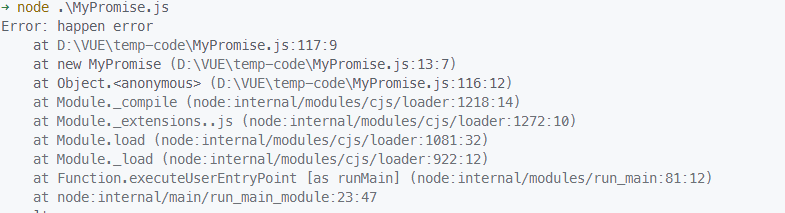
面试官: 手写个Promise吧 我: ...... # 函数式写法 ```js function MyPromise(executor) { var self = this; self.status = 'pending'; // Promise状态,初始为pending self.value = undefined; // Promise的值 self.reason = undefined; // Promise失败的原因 self.onResolvedCallbacks = []; // Promise resolve时的回调函数集合 self.onRejectedCallbacks = []; // Promise reject时的回调函数集合 function resolve(value) { if (self.status === 'pending') { // 只有在pending状态下才能改变Promise状态 self.status = 'fulfilled'; self.value = value; self.onResolvedCallbacks.forEach(function (fn) { fn(self.value); }); // 执行所有resolve回调函数 } } function reject(reason) { if (self.status === 'pending') { // 只有在pending状态下才能改变Promise状态 self.status = 'rejected'; self.reason = reason; self.onRejectedCallbacks.forEach(function (fn) { fn(self.reason); }); // 执行所有reject回调函数 } } try { executor(resolve, reject); // 执行executor函数 } catch (error) { reject(error); // 执行executor函数出错时,Promise被拒绝 } } MyPromise.prototype.then = function (onFulfilled, onRejected) { onFulfilled = typeof onFulfilled === 'function' ? onFulfilled : function (value) { return value; }; onRejected = typeof onRejected === 'function' ? onRejected : function (reason) { throw reason; }; var self = this; var promise2; if (self.status === 'fulfilled') { promise2 = new MyPromise(function (resolve, reject) { setTimeout(function () { // 确保异步执行 try { var x = onFulfilled(self.value); resolvePromise(promise2, x, resolve, reject); // 处理返回值,并根据返回值执行resolve或reject } catch (error) { reject(error); } }); }); } else if (self.status === 'rejected') { promise2 = new MyPromise(function (resolve, reject) { setTimeout(function () { // 确保异步执行 try { var x = onRejected(self.reason); resolvePromise(promise2, x, resolve, reject); // 处理返回值,并根据返回值执行resolve或reject } catch (error) { reject(error); } }); }); } else if (self.status === 'pending') { promise2 = new MyPromise(function (resolve, reject) { self.onResolvedCallbacks.push(function (value) { // 将resolve回调函数存储起来 setTimeout(function () { // 确保异步执行 try { var x = onFulfilled(value); resolvePromise(promise2, x, resolve, reject); // 处理返回值,并根据返回值执行resolve或reject } catch (error) { reject(error); } }); }); self.onRejectedCallbacks.push(function (reason) { // 将reject回调函数存储起来 setTimeout(function () { // 确保异步执行 try { var x = onRejected(reason); resolvePromise(promise2, x, resolve, reject); // 处理返回值,并根据返回值执行resolve或reject } catch (error) { reject(error); } }); }); }); } return promise2; }; // 处理Promise的返回值,根据返回值执行resolve或reject function resolvePromise(promise2, x, resolve, reject) { if (promise2 === x) { // 如果promise2和x是同一个对象,则抛出TypeError reject(new TypeError('Chaining cycle detected for promise')); } var called = false; // 防止多次调用resolve或reject if (x instanceof MyPromise) { // 如果x是一个Promise对象 if (x.status === 'pending') { // 如果x处于pending状态,则等待x状态改变后再执行resolve或reject x.then(function (value) { resolvePromise(promise2, value, resolve, reject); }, reject); } else { // 如果x已经处于fulfilled或rejected状态,则直接执行resolve或reject x.then(resolve, reject); } } ``` # 类的写法 ```js class MyPromise { constructor(executor) { this.status = 'pending'; this.value = undefined; this.reason = undefined; this.onResolvedCallbacks = []; this.onRejectedCallbacks = []; const resolve = (value) => { if (this.status === 'pending') { this.status = 'fulfilled'; this.value = value; this.onResolvedCallbacks.forEach((fn) => fn(this.value)); } }; const reject = (reason) => { if (this.status === 'pending') { this.status = 'rejected'; this.reason = reason; this.onRejectedCallbacks.forEach((fn) => fn(this.reason)); } }; try { executor(resolve, reject); } catch (error) { reject(error); } } then(onFulfilled, onRejected) { onFulfilled = typeof onFulfilled === 'function' ? onFulfilled : (value) => value; onRejected = typeof onRejected === 'function' ? onRejected : (reason) => { throw reason; }; const promise2 = new MyPromise((resolve, reject) => { if (this.status === 'fulfilled') { setTimeout(() => { try { const x = onFulfilled(this.value); resolvePromise(promise2, x, resolve, reject); } catch (error) { reject(error); } }); } else if (this.status === 'rejected') { setTimeout(() => { try { const x = onRejected(this.reason); resolvePromise(promise2, x, resolve, reject); } catch (error) { reject(error); } }); } else if (this.status === 'pending') { this.onResolvedCallbacks.push((value) => { setTimeout(() => { try { const x = onFulfilled(value); resolvePromise(promise2, x, resolve, reject); } catch (error) { reject(error); } }); }); this.onRejectedCallbacks.push((reason) => { setTimeout(() => { try { const x = onRejected(reason); resolvePromise(promise2, x, resolve, reject); } catch (error) { reject(error); } }); }); } }); return promise2; } } function resolvePromise(promise2, x, resolve, reject) { if (promise2 === x) { return reject(new TypeError('Chaining cycle detected for promise')); } let called = false; if (x instanceof MyPromise) { if (x.status === 'pending') { x.then((value) => resolvePromise(promise2, value, resolve, reject), reject); } else { x.then(resolve, reject); } } else if (x !== null && (typeof x === 'object' || typeof x === 'function')) { try { const then = x.then; if (typeof then === 'function') { then.call(x, (value) => { if (called) return; called = true; resolvePromise(promise2, value, resolve, reject); }, (reason) => { if (called) return; called = true; reject(reason); }); } else { resolve(x); } } catch (error) { if (called) return; called = true; reject(error); } } else { resolve(x); } } ``` 测试一下 ```js // 成功的Promise const p1 = new myPromise((resolve,reject)=>{ setTimeout(()=>{ resolve(111) },500) }).then((res)=>{ console.log(res) // result }) ``` ```js // 失败的Promise const p2 = new MyPromise((resolve,reject)=>{ throw new Error('happen error') }).then(()=>{},(e)=>{ console.log(e) //Error: happen error }) ``` ![失败的Promise](https://iiu.oss-cn-chengdu.aliyuncs.com/ohmycat/pictures/xJzr45_1675995797489.png?x-oss-process=image/resize,w_800)
2023 年 2 月 10 日 10:23# promise
阅读全文⇢

debian11基本环境配置(java,node,redis,nginx,mysql8)

# 1. 安装JAVA # 1.1 安装 OpenJDK 11 Java是用于构建各种应用程序和系统的最流行的编程语言之一。Java可以在所有主流的操作系统和设备上运行 在撰写本文时,`OpenJDK 11`是`Java`的最新长期支持版本LTS。它也是Debian 11中默认的Java开发和运行时。 以root或具有sudo权限的用户运行以下命令,以更新软件包索引并安装Open JDK 11 JDK软件包。 如果仅需要JRE,则安装`openjdk-11-jre`。如果你为了使Java运行时占用空间最少,请安装`openjdk-11-jdk-headless`。 安装完成后,您可以运行命令`java -version`打印java版本号。至此,您已经在Debian 11安装Java 11。JRE包含在JDK软件包中。 ```bash sudo apt update sudo apt install openjdk-11-jdk java -version ``` # 1.2 安装 OpenJDK 17 ```bash sudo apt update sudo apt install openjdk-17-jdk java -version ``` # 1.3 安装 OpenJDK 8 `OpenJDK 8`在Debian 11将不再提供支持,你可以选择方案有两种,一种是在Debian 10安装 OpenJDK 8。 如果你是刚开始编写应用,我们建议你安装OpenJDK 11。因为OpenJDK 11为Java带来更多的新特性。 最后一种不建议的方案是手动安装Oracle java 1.8。然后设置环境JAVA_HOME环境变量,将Java和javac二进制可执行文件添加到PATH环境变量。 # 1.4 卸载 Java 您可以使用apt像卸载任何其他软件包一样卸载Java。例如,要卸载jdk软件包,请输入: ```bash sudo apt remove openjdk-11-jdk ``` # 2.Mysql 8 要将 MySQL APT 存储库添加到系统,请转到存储库下载页面并使用以下 wget 命令下载最新的发行包: ```bash wget http://repo.mysql.com/mysql-apt-config_0.8.23-1_all.deb ``` 下载完成后,以具有 sudo 权限的用户身份安装发行包: ```bash sudo apt install ./mysql-apt-config_0.8.23-1_all.deb ``` 通过运行以下命令更新包列表并安装 MySQL 服务器包: ```bash sudo apt update sudo apt install mysql-server ``` 安装完成后, MySQL 服务将自动启动,您可以通过键入以下内容来验证它 ```bash systemctl status mysql ``` 修改密码: ```sql ALTER USER 'root'@'localhost' IDENTIFIED WITH mysql_native_password by 'qq147.'; ``` # 3.安装redis 安装redis ``` apt install redis-server ``` 启动redis服务 ```bash systemctl start redis-server ``` 设置自启动 ```bash systemctl enable redis-server ``` 配置Redis 默认情况下,Redis 侦听本地主机,如果要从远程主机连接 Redis,则需要允许 Redis 进行远程连接。 为此,请使用您喜欢的编辑器编辑 Redis 配置文件: ```bash vim /etc/redis/redis.conf ``` 注释 `#bind 127.0.0.1 -::1` # 4.安装node 安装nvm ```bash curl -o- https://raw.githubusercontent.com/nvm-sh/nvm/v0.38.0/install.sh | bash ``` 安装node 18.15.0 ```bash nvm install 18.15.0 ``` # 5.安装nginx ## 5.1 从官网下载 nginx 压缩包 ```bash sudo wget https://nginx.org/download/nginx-1.22.0.tar.gz -O /opt/nginx-1.22.0.tar.gz ``` ## 5.2 安装`nginx`需要的依赖 ```bash sudo apt install libtool make gcc g++ libpcre3 libpcre3-dev openssl libssl-dev zlib1g zlib1g-dev -y ``` 5.2 编译并安装`nginx` 1. 解压 nginx 压缩包 ```bash sudo tar -zxvf /opt/nginx-1.22.0.tar.gz -C /opt ``` 2. 指定安装路径及启用的模块 ```bash cd /opt/nginx-1.22.0 && sudo ./configure --prefix=/usr/local/nginx-1.22.0 --with-http_ssl_module --with-http_sub_module --with-http_gunzip_module --with-http_stub_status_module --with-pcre ``` 3. 编译并安装 ```bash sudo make && sudo make install ``` 4. 创建`nginx`的配置及工作目录文件夹 ```bash sudo mkdir -p /etc/nginx/conf.d /etc/nginx/default.d /var/www/html ``` 5. 复制`html`文件到工作目录 ```bash sudo cp /usr/local/nginx-1.22.0/html/* /var/www/html ``` 6. 清除解压出来的资源文件夹 ```bash sudo rm -rf /opt/nginx-1.22.0 ``` 5.3 编辑*nginx*的配置文件 编辑 nginx.conf 文件 ```bash sudo vim /usr/local/nginx-1.22.0/conf/nginx.conf ``` ```conf ########## nginx.conf 配置文件内容 worker_processes auto; #设置值和CPU核心数一致 user nginx nginx; error_log /usr/local/nginx-1.22.0/logs/error.log crit; #日志位置和日志级别 pid /usr/local/nginx-1.22.0/nginx.pid; #进程id worker_rlimit_nofile 65535; #指定此进程可以打开的最大文件描述符的值 events { use epoll; worker_connections 65535; } http { include mime.types; default_type application/octet-stream; log_format main '$remote_addr - $remote_user [$time_local] "$request" ' '$status $body_bytes_sent "$http_referer" ' '"$http_user_agent" $http_x_forwarded_for'; server_names_hash_bucket_size 128; client_header_buffer_size 32k; large_client_header_buffers 4 32k; client_max_body_size 8m; sendfile on; tcp_nopush on; keepalive_timeout 60; tcp_nodelay on; fastcgi_connect_timeout 300; fastcgi_send_timeout 300; fastcgi_read_timeout 300; fastcgi_buffer_size 64k; fastcgi_buffers 4 64k; fastcgi_busy_buffers_size 128k; fastcgi_temp_file_write_size 128k; gzip on; gzip_min_length 1k; gzip_buffers 4 16k; gzip_http_version 1.0; gzip_comp_level 2; gzip_types text/plain application/x-javascript text/css application/xml; gzip_vary on; #limit_zone crawler $binary_remote_addr 10m; include /etc/nginx/default.d/*.conf; include /etc/nginx/conf.d/*.conf; } ``` ## 安装 ```bash sudo apt install curl gnupg2 ca-certificates lsb-release ``` 安装被设置自启动 ```bash apt install nginx systemctl start nginx systemctl enable nginx ```
2023 年 2 月 2 日 11:00# debian# mysql# java# node
阅读全文⇢

flex布局导致内容缩放错误

# flex布局 现如今`flex`布局是现在前端布局的神器,使用这个布局方式能够能轻易的实现各种效果 例如: - 居中效果:只需向父容器添加`display: flex`,并设置两个属性即可使子元素在水平和垂直方向均居中,更重要的是支持响应式,这使得更好的适配移动端布局。 ````html <div class="container"> <div>xxxxx</div> </div> <style scoped> .container{ display: flex; justify-content: center; align-items: center; } </style> ```` # 起因 最近在做该网站的时候觉得文章阅读界面在pc端显示两端都比较空,便想把原本的布局组件改为三栏式布局,于是写下下列代码 ````html <template> <NavBar /> <div v-bind="$attrs" flex justify-center> <div w-60 display-none lg:display-block> <slot name="pre" /> </div> <div p-4 max-w-750px sm:min-w-750px flex-1> <slot /> </div> <div w-60 display-none lg:display-block> <slot name="sidebar" /> </div> </div> </template> ```` 该组件使用具名插槽的方式定义布局,使用通过设置顶层元素 `flex` 达到三栏布局效果,设置完成后pc端(或者说是大屏显示下)显示完全正常,但是调整到移动端小屏显示时就出现了问题。 如图 ![](http://iiu.oss-cn-chengdu.aliyuncs.com/ohmycat/pictures/mdrD4z_1672286441027.png?x-oss-process=image/resize,w_1080) 懵懂的我以为是中间的元素没有设置 `flex-shrink` 属性导致不能自动缩小,但我设置上该属性后依然无效,我又设置了其他我知道的属性尝试,但依然无效,更重要得是当界面中没有代码片段得时候显示又是正常的,啊这... # 面向百度编程 >那来吧,作为一个合格的程序员,那么必需得会百度咯 ![](http://iiu.oss-cn-chengdu.aliyuncs.com/ohmycat/pictures/CfwDMx_1672287232819.gif?x-oss-process=image/resize,w_1080) 经过一番搜索,发现 `flex` 下得元素自适应缩小都不会超过元素的最小宽度,而当界面有代码显示的时候,横向内容是不会换行的,也就是说会有最小宽度,这样就会导致缩小到最小宽度的时候就不会在缩小了,就把父容器给撑开了。 弹性项目不能小于沿主轴的内容大小。 因为默认值是 - `min-width: auto` - `min-height: auto` # 解决办法 既然是元素的默认值导致的问题,那么我们就手动设置一个最小宽度,于是便给需要正常缩放的元素设置一个最小宽度 - `min-width: 0` - `min-height: 0` - `overflow: hidden`(或任何其他值,`visible`除外) ````css /** flex子元素中需要缩小的元素 **/ .element{ min-width: 0; } ```` 大功告成,又学到了一招,又可以愉快的写bug了!
2022 年 12 月 29 日 12:27# flex
阅读全文⇢

函数调用式Message组件

# 为什么需要函数式调用 函数式组件是使用`vue`中提供的`h`和`render`函数编写组件,可以在使用时只需要调用相应函数即可,不需要写在`<template/>`标签中,适合用来编写提示,Modal等组件。 # 例如Message组件 > Message.vue 布局组件 ````html <script setup lang="ts"> import { ref,onMounted } from 'vue' const props = defineProps({ msg:{ type: String }, onClose: { type: Function, required: false, }, top:{ type: Number, required: false } }) defineEmits(['destroy']) const visible = ref(false) function close(){ visible.value = false } function startTimer(){ setTimeout(()=>{ close() },3000) } onMounted(() =>{ startTimer() visible.value = true }) defineExpose({ visible, close, }) </script> <template> <transition @before-leave="onClose" @after-leave="$emit('destroy')"> <div class="message" v-show="visible" :style="{top: props.top + 'px'}"> <div>{{props.msg}}</div> </div> </transition> </template> <style scoped> .message{ /* border: 1px solid red; */ position: fixed; top: 1rem; left: 50%; transform: translateX(-50%); box-shadow: 0 3px 12px rgba(0,0,0,0.2); padding: 6px 12px; border-radius: 0.25rem; user-select: none; transition: top .2s; } .v-enter-active, .v-leave-active { transition: opacity 0.2s ease; } .v-enter-from, .v-leave-to { opacity: 0; } </style> ```` > Message/index.ts ````ts import { createVNode, render, shallowReactive } from 'vue' import type {VNode,ComponentInternalInstance} from 'vue' import Message from './message.vue' interface MessageContext { id: string vNode: VNode vm: ComponentInternalInstance | null props: any } export const instances = shallowReactive<MessageContext[]>([]) const message = (msg: string)=>{ createMessage(msg) } let seed = 1 function createMessage(msg: string){ let top = 12 if(instances.length){ let pre = instances[instances.length-1] top = pre.props.top + 40 } const container = document.createElement('div') const props = { msg, top, onClose: ()=>{ closeMessage(instance) }; onDestroy: ()=>{ render(null,container) console.log('destroy') } } let vNode = createVNode(Message,props) let vm = vNode.component render(vNode,container) document.body.appendChild(container.firstElementChild!) const instance = { id: `message_${seed++}`, vNode, vm, props: vNode.component?.props } instances.push(instance) return instance } function closeMessage(instance: MessageContext){ const idx = instances.findIndex(i=>i.id === instance.id) if(idx === -1) return instances.splice(idx,1) console.log('closeMessage',idx) instances.forEach((i) =>{ i.props.top -= 40 }) } export default message ```` # 组件使用 ````html <script setup lang="ts"> import Message from './components/Message' function handleClick(){ Message("成功的消息") } </script> <template> <div> <button @click="handleClick">Click</button> </div> </template> ````
2022 年 12 月 26 日 15:32# 组件# message
阅读全文⇢